
NTLM channel binding for web apps
Draft: I didn’t manage to get this working.
What went wrong:
- Firefox resets the connection when going via Burp before the NTLM response is sent.
- We don't see the NTLM response in Burp.
- But in Wireshark and DevTools we see that it is transmitted.
- Chrome/Chromium respond with status code 400 even if the channel binding token was replaced.
- Is there some kind of mutual authentication?
For web applications using HTTPS and NTLM authentication (especially in AD environments), channel binding ("Extended Protection for Authentication", "EPA" in IIS) is an important setting to prevent NTLM relaying attacks.
First, make sure that the web application is not reachable via HTTP. Preventing NTLM relaying for HTTP would require HTTP signing (which is technically possible, but not commonly seen).
NTLM flow (high-level)
Web app responds with status code 401 and response header
WWW-Authenticate: NTLM.- This response makes the browser show a username/password pop-up (similar to Basic/Digest auth).
- Entering credentials triggers the NTLM flow.
Browser sends an NTLM NEGOTIATE message to the server.
- It uses the request header
Authorization: NTLM TlRMTVNTUAABAA<snip>.
- It uses the request header
Web app responds with status code 401 and an NTLM CHALLENGE message.
- It uses the response header
WWW-Authenticate: NTLM TlRMTVNTUAACAA<snip>. - This header includes useful information about the server.
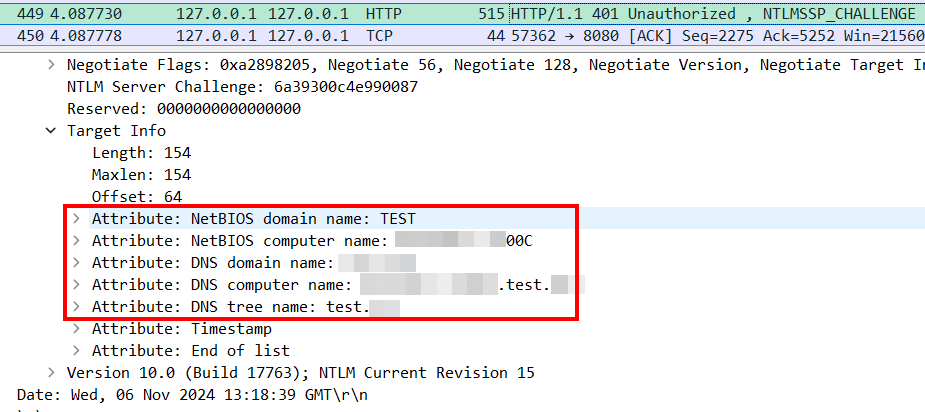
(Note that the server discloses that information to unauthenticated users.)
- It uses the response header
Browser authenticates using an NTLM RESPONSE ("AUTHENTICATE") message.
- This is where the user is actually authenticated.
- Browser again uses the
Authorization: NTLM TlRMTVNTUAADAAAA<snip>header. - The AUTHENTICATE message might include a channel binding attribute (only if the client/browser supports it).
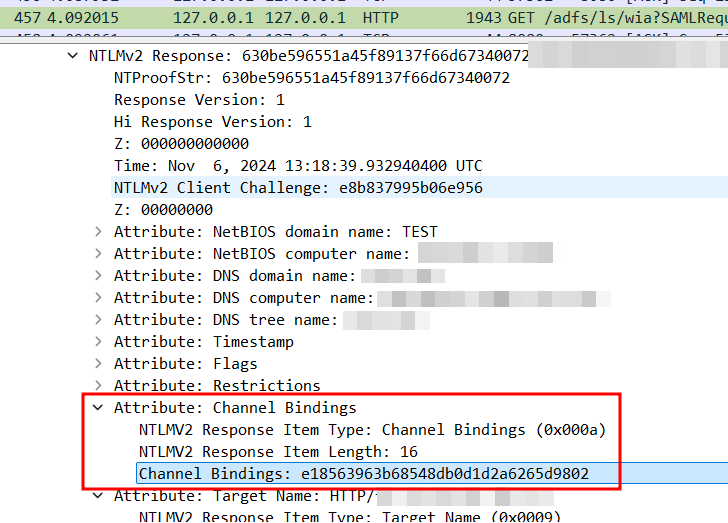
Web app responds with success or failure.
200with a cookie- redirect with auth info (JWT/SAML)
401for failure- or seemingly weird behavior like TCP reset /
400
Why proxies break things
Authentication failures or weird behavior when using TLS intercepting proxies (like Burp) might result from the server enforcing channel binding. In Burp, you can use "Platform Authentication" to ask Burp to do NTLM authentication with channel binding for you. If the browser does it and the server enforces channel binding, authentication must fail.
Testing idea
Goal: get an AUTHENTICATE message with a wrong channel binding attribute using correct credentials. If authentication fails, try to replace the channel binding attribute with the correct value.
- Go through the auth flow entering correct credentials in the browser and intercept the NTLM RESPONSE message (step 4 above).
- Copy the Base64-encoded AUTHENTICATE message.
- Use the following script to parse the channel binding token (CBT) and replace it with the correct one:
- The script fetches the certificate fingerprint from the server.
- Make sure your Python process can reach the destination server without a TLS intercepting proxy.
- Replace
targetandntlm_authenticate_message.
import base64
import hashlib
import ssl
import struct


def parse_and_replace_cbt(msg, replace_with="a" * 32):
    msg = base64.b64decode(msg).hex()
    try:
        cbt = msg.split("0a001000")[1][:32]
    except IndexError:
        print("No Channel Binding Token found")
        return
    print("Channel Binding Token:", cbt)
    msg = msg.replace(cbt, replace_with)
    print("Message with CBT replaced:", base64.b64encode(bytes.fromhex(msg)).decode())


def get_certificate_fingerprint(hostname, port=443):
    context = ssl.create_default_context()
    with context.wrap_socket(ssl.socket(), server_hostname=hostname) as conn:
        conn.connect((hostname, port))
        cert = conn.getpeercert(binary_form=True)
    sha256_fingerprint = hashlib.sha256(cert).hexdigest()
    return sha256_fingerprint


def compute_cbt_from_fingerprint(fingerprint):
    fingerprint = bytes.fromhex(fingerprint)
    token = b"tls-server-end-point:" + fingerprint
    token_len = len(token)
    prefix = b"\x00" * 16
    prefix += struct.pack("I", token_len)
    digest = hashlib.md5()
    digest.update(prefix)
    digest.update(token)
    return digest.hexdigest()


target = {"hostname": "example.com", "port": 443}
ntlm_authenticate_message = "TlRMTVNTUAADAAAA..."

new_cbt = compute_cbt_from_fingerprint(get_certificate_fingerprint(**target))
parse_and_replace_cbt(ntlm_authenticate_message, new_cbt)