
HTTPS traffic decryption with Wireshark
To decrypt HTTPS traffic you must instruct your browser to log ephemeral key material. You can do this by setting the SSLKEYLOGFILE environment variable (works for Chrome, Firefox, Edge).
Make sure to not set it persistently, to not forget to unset it later. Also consider using a different browser than your usual one.
Start your browser (example for Chrome on Windows):
$env:SSLKEYLOGFILE="C:\path\to\sslkeys.log"; Start-Process "C:\Program Files\Google\Chrome\Application\chrome.exe"Use Wireshark or tcpdump to capture traffic while browsing HTTPS websites. (You can dump the traffic on the client or on the server.)
In Wireshark, navigate to Edit > Preferences > Protocols > TLS and set your SSLKEYLOGFILE as "(Pre)-Master-Secret log filename".
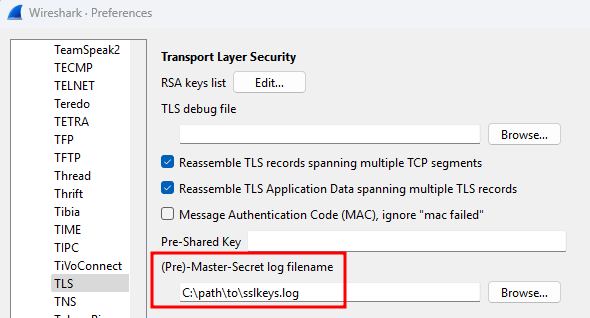
Previously encrypted traffic should now be available in plain text.

Deprovisioning
- Unset the environment variable.
- Delete or archive your key file securely.
SSL/TLS interception of Java clients
SSL/TLS traffic of Java applications can be intercepted using jSSLKeyLog.
- Project: https://github.com/jsslkeylog/jsslkeylog
- Download binary (internal link)
You’ll need to locate the command line used to start the Java program (usually hidden in some script or batch file). It will usually look like java ... -jar file.jar ... or java ... some.class.Name ....
Then add an additional parameter directly after the java command name:
-javaagent:jSSLKeyLog.jar=/path/to/your_logfile.log
Example:
java -javaagent:jSSLKeyLog.jar=/path/to/your_logfile.log ... -jar file.jar