
Pentest planning process
This page describes how we plan and track penetration tests using the Pentest Planning Board, who is responsible for what, and which rules everyone follows.
Quick reference
Board: the Pentest Planning Board is the source of truth for planning. Every project corresponds to one card, tracked through the five stages in the table below. We discuss the projects every Monday in our daily Stammtisch ("weekly project status update").
| Stage | Summary | Due date |
|---|---|---|
| Prospects | Lead runs the enquiry and follow-ups until we schedule the project, then move to "Projects scheduled". | The day to follow-up with the customer. |
| Projects scheduled | Order is in: block the calendar, assign the team, finish prep before test week. Move to Projects ready when access, credentials, scope, and environment fit the planned start. | The day to contact/follow-up with the customer for pentest preparation. |
| Projects ready | Prepared to start on the agreed date. Move to Projects in progress when pentesting begins on that date. | Planned start date. |
| Projects in progress | Customer is notified and the team conducts the pentest in the agreed window. Move to Projects finished when the customer has received the report. | Last test or report day + 1 working day. |
| Projects finished | Report is with the customer. Mark the Deck card done only after SysReptor project is set finished, then invoicing and archive. | Not required. |
On every card:
- No sensitive content.
- Comments hold contact points as meta-information.
- Reference the SysReptor project URL in the description if a project exists.
- Details about the project, scope, contact persons, etc. go into the SysReptor project notes.
- The "lead" is responsible for maintaining the card and the project.
Discuss at Stammtisch or with founders if:
- Prospects are stuck after repeated follow-ups.
- Projects are at risk.
- You need help.
Why this process matters
We run many projects in parallel. A formalized pentest planning process keeps an overview, spreads knowledge beyond any single person, and avoids bottlenecks when someone is unavailable. A process that is not only written down but actually followed also helps avoid or reduce human error (for example someone forgetting to engage the customer), reduces communication errors, and makes it explicit who is responsible for what at each step.
We use kanban-style project management for this. The board is a living tool: it only stays useful if the whole team maintains it. If you are lead on a card, you are responsible for keeping that card accurate and up to date until the lead changes.
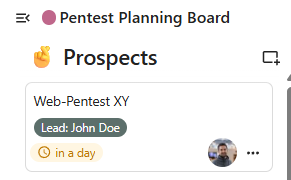
The board is the single source of truth for pentest planning. We use it in our daily Stammtisch to see project status. Every card stays on the board until it is finished or no longer relevant and is explicitly marked completed.
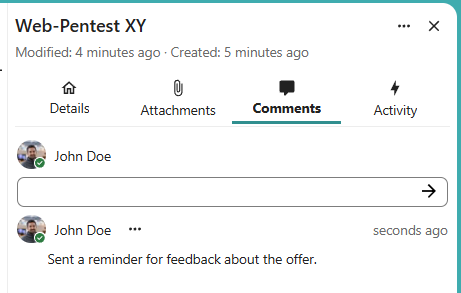
General rule: if it is not documented, it did not happen. Record decisions and waiting states in the card comments so the status of each card is clear for everyone, actions and decisions can be traced later, and it is visible that we did our part (for example when a customer is slow or unresponsive).
Board location and discussion
The Pentest Planning Board is a Nextcloud Deck, shared with every Syslifters esmployee: Pentest Planning Board in Nextcloud Deck
We discuss the projects every Monday in our daily Stammtisch ("weekly project status update").
Board structure
The board has five stages (columns), in order:
- Prospects
- Projects scheduled
- Projects ready
- Projects in progress
- Projects finished

What each card represents
Each card is one pentest project.
A card must never hold sensitive information. It should contain only the meta information needed to track the project and its status.
It should include:
- Title: identifiable project or customer reference, without sensitive information.
- Lead: one person tagged as lead; that person owns the card until reassigned.
- Assigned pentesters: everyone involved in delivery (lead may be the only assignee in early stages).
- Project URL to description: link to the matching SysReptor project if one exists.
- Comments: short, meta-level updates only (for example: customer contacted by email on 4 April regarding URL and credentials). Do not paste secrets, full correspondence, or scope detail here.
Document operational details and sensitive information in a SysReptor project. The lead creates a SysReptor project if none exists yet, and always adds its URL to the card description so the card points to the full record and stays linked to the right project when the lead is passed to someone else.
Stage 1: Prospects
When a pentest enquiry arrives, the person in contact with the customer becomes lead and adds a new card in Prospects. Set the correct Lead tag for that person.
You can optionally capture details in a dedicated SysReptor project if there are details or sensitive information to be documented. Fro this, create a SysReptor project and add the URL to the card.
After the communication with our customers, we often have to wait for a response (e.g., for accepting the offer, providing URLs and credentials, etc.):
- Set a due date as a reminder to re-engage if the customer goes quiet (for example, about two weeks after sending an offer, or the day after the date the customer said they would reply).
- Document any outreach in the card comments on a meta level (see "what each card represents"). This creates traceability, demonstrates that we followed up, and reinforces the “document or it didn’t happen” rule.
If repeated follow-ups fail (customer keeps postponing), bring it to the daily Stammtisch. As a rule of thumb, after three unsuccessful engagement attempts, discuss whether to close the prospect or try again. Three is not a hard cap. Context decides.
Stage 2: Projects scheduled
When the customer schedules the order, the the card moves to "Projects scheduled".
The lead then:
- Informs Christoph so he stays in the loop on scheduling and assignments.
- Blocks the project in the shared pentesting calendar.
- Assigns pentesters who will run the test (always one lead, with others supporting if needed).
- May assign a new lead by changing the lead tag to the person now responsible for next steps.
Our goal is to have everything ready for the pentest (network access, URLs, credentials, source code, etc.) one week before the test starts. Always set the due date when you plan to contact the customer next. This can be for example 30 days before the pentest starts (e.g., for booking a hotel), 14 days before the test starts (e.g., for requesting information for the customer), or 3 days before the pentest starts (e.g., for the last reminder).
A project is ready when everything is ready for the test: accomodation, reachable systems, working credentials, clarified scope, etc.
While waiting on the customer:
- Note every follow-up as comments in the card (for example that access was requested).
- Add technical and sensitive information to the SysReptor project's notes.
- Refresh the due date for the next follow-up. For example, set it to Wednesday the same week. If there is still no reply, follow up Wednesday, note it, set due date to Friday, and repeat.
- If a project is at risk or you need support, raise an issue in our daily Stammtisch or contact one of our founders.
Stage 3: Projects ready
When preparation is complete and testing can start as planned, move the card to "Projects ready" and set the due date to the planned start date of the project.
Stage 4: Projects in progress
On the start date, when work actually begins, the lead informs the customer that testing has started, then moves the card to Projects in progress.
Set the due date to end of the engagement plus one working day. For example, if the last test or reporting day is Friday, set the due date to Monday morning before Stammtisch.
Stage 5: Projects finished
After the report was sent to the customer, the lead moves the card to "Projects finished".
The lead marks the card as done when the linked SysReptor project (the URL in the card description) is set to status "Finished". The delivery is now complete, the project can be invoiced and will be auto-encrypted three months later.
We will archive the card together in our weekly project status update meeting.